Skip to content
Apple Lab Uganda
MacBook · MacBook Air · 2011

MacBook Air 2011 -A1369 Repair in Kampala

Fast, warranty-backed MacBook Air 2011 -A1369 repairs at Apple Lab Uganda on Kampala Road. Certified technicians, genuine parts and a free diagnosis before any work begins.

  • Genuine parts
  • 9 parts available
  • 17 repair services
Replacement parts

MacBook Air 2011 -A1369 parts we replace.

Genuine or premium parts, fitted by certified technicians. Book online or get a price on WhatsApp.

Display Display replacement for MacBook Air 2011 -A1369 Book
Battery Battery replacement for MacBook Air 2011 -A1369 Book
KeyBoard KeyBoard replacement for MacBook Air 2011 -A1369 Book
Track Pad Track Pad replacement for MacBook Air 2011 -A1369 Book
Speaker Speaker replacement for MacBook Air 2011 -A1369 Book
Top Case Top Case replacement for MacBook Air 2011 -A1369 Book
Touch ID Touch ID replacement for MacBook Air 2011 -A1369 Book
Mother Board Mother Board replacement for MacBook Air 2011 -A1369 Book
Charging Port Charging Port replacement for MacBook Air 2011 -A1369 Book
MacBook Air 2011 -A1369

About the MacBook Air 2011 -A1369

Device
MacBook
Series
MacBook Air
Release
2011
Repair at
Kampala Road, B16

Specifications

🍎💻The Specifications of MacBook Air A1369 (2011):

🍏 Display:

  • 13.3-inch LED-backlit glossy widescreen display with support for millions of colors
  • Resolution: 1440 by 900 pixels

🍏 Processor:

  • 1.7GHz dual-core Intel Core i5 processor (Turbo Boost up to 2.7GHz) with 3MB shared L3 cache
  • Configurable to 1.8GHz dual-core Intel Core i7 processor (Turbo Boost up to 2.9GHz) with 4MB shared L3 cache

🍏 Memory (RAM):

  • 4GB of 1333MHz DDR3 SDRAM onboard memory
  • Configurable to 2GB or 4GB

🍏 Storage:

  • 128GB or 256GB of flash storage

🍏 Graphics:

  • Intel HD Graphics 3000 processor with 384MB of DDR3 SDRAM shared with main memory
  • Dual display and video mirroring: Simultaneously supports full native resolution on the built-in display and up to 2560 by 1600 pixels on an external display, both at millions of colors

🍏 Wireless Connectivity:

  • Wi-Fi: 802.11n Wi-Fi wireless networking; IEEE 802.11a/b/g compatible
  • Bluetooth: Bluetooth 4.0 wireless technology

🍏 Camera:

  • 720p FaceTime HD camera

🍏 Ports:

  • Two USB 2.0 ports (up to 480 Mbps)
  • Thunderbolt port (up to 10 Gbps)
  • MagSafe power port
  • Ethernet port (with optional adapter)
  • Audio in/out
  • SD card slot

🍏 Battery and Power:

  • Up to 5 hours of wireless web battery life
  • Built-in 50-watt-hour lithium-polymer battery
  • 45W MagSafe power adapter with cable management system; MagSafe power port

🍏 Operating System:

  • macOS High Sierra (can be upgraded to later versions depending on compatibility)

🍏 Dimensions and Weight:

  • Height: 0.11–0.68 inch (0.3–1.7 cm)
  • Width: 12.8 inches (32.5 cm)
  • Depth: 8.94 inches (22.7 cm)
  • Weight: 2.96 pounds (1.35 kg)

These specifications showcase the MacBook Air A1369 (2011) as a lightweight and portable laptop with decent processing power and connectivity options, making it suitable for everyday tasks and light productivity work.

Liquid Damaged Service

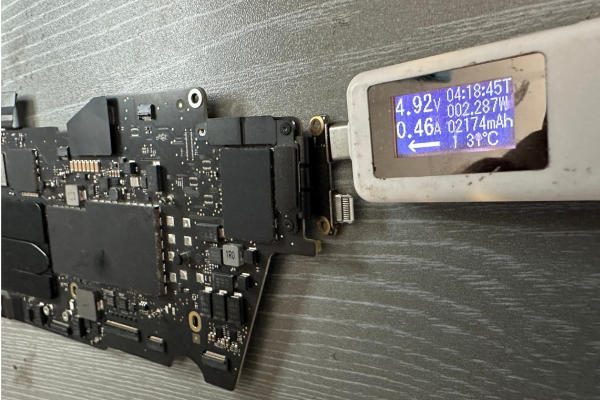
Apple Lab Uganda is your go-to solution for reviving dead or liquid-damaged Macs. Our team of skilled and experienced technicians employs advanced techniques and genuine parts to diagnose and resolve a wide range of issues. With a focus on efficiency…

Book this service

Display Repair Service​

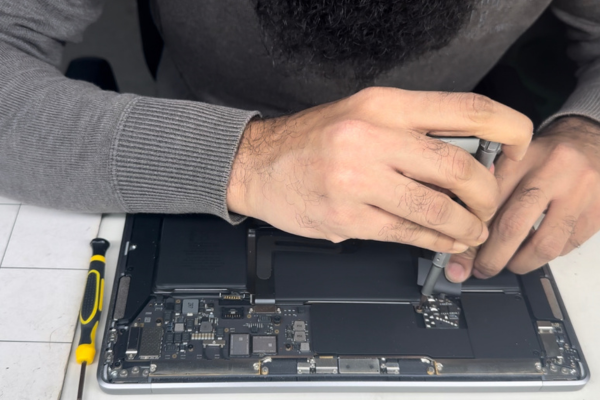
Breathe new life into your Mac's visuals with Apple Lab Uganda's outstanding display replacement service. It takes only one hour to replace the display unit. Our expert Apple technicians meticulously replace your damaged display with an original Apple screen, delivering…

Book this service

KeyBoard Repair Service

Rediscover seamless typing with Apple Lab Uganda's MacBook keyboard replacement service. Our experienced Apple technicians skillfully replace your faulty keyboard with an original component, backed by a money-back guarantee, restoring your device's functionality. Call us at Apple Lab Uganda for…

Book this service

Battery Replacement Service

At Apple Lab Uganda, we provide a swift and efficient MacBook battery replacement service to rejuvenate your device's performance. It takes only two hours maximum to replace the battery. We use original OEM batteries, ensuring optimal performance and durability. Contact…

Book this service
Good to know

MacBook Air 2011 -A1369 repair guide & tips

Tips & Tricks

👍 Maximize Battery Life:

Extend the battery life of your MacBook Air by adjusting energy-saving settings. Lower the screen brightness, disable unnecessary background processes, and reduce keyboard backlighting to conserve battery power. Adjust these settings in System Preferences > Energy Saver.


👍 Utilize Spotlight Search:

Take advantage of Spotlight Search to quickly find files, applications, and information on your MacBook Air. Press Command + Spacebar to open Spotlight, then start typing your search query. Spotlight can also perform calculations, conversions, and more.


👍 Organize Desktop Spaces:

Organize your workspace by using multiple desktop spaces. Swipe left or right with three or four fingers on the trackpad to switch between spaces, or use Mission Control to view all open windows and spaces. You can create and manage spaces in System Preferences > Mission Control.


👍 Customize Keyboard Shortcuts:

Streamline your workflow and perform tasks more efficiently by customizing keyboard shortcuts. Create custom shortcuts for applications, menu items, and system functions in System Preferences > Keyboard > Shortcuts.


👍 Secure Your MacBook Air:

Protect your MacBook Air and your data by setting up a strong password. Additionally, consider enabling FileVault encryption to encrypt the contents of your disk and require a password to decrypt, ensuring your data remains secure.


👍 Backup Regularly:

Since the MacBook Air A1369 (2011) may be prone to hardware failures due to its age, it’s crucial to back up your data regularly. Use Time Machine to create automatic backups to an external hard drive or set up iCloud Backup for added convenience and redundancy.


👍 Optimize Performance:

Improve the performance of your MacBook Air by closing unnecessary applications and freeing up disk space. You can also consider upgrading the RAM or replacing the hard drive with a solid-state drive (SSD) for faster performance.


👍 Explore Legacy macOS Features:

Since the MacBook Air A1369 (2011) may not support the latest macOS versions, explore the features available in the macOS version installed on your device. Familiarize yourself with applications such as iLife Suite (iPhoto, iMovie, GarageBand) and Safari for web browsing.


👍 Clean Your MacBook Air:

Keep your MacBook Air clean and free of dust and debris to prevent overheating and hardware issues. Use compressed air or a soft brush to remove dust from the keyboard, ports, and vents.


👍 Consider Upgrade Options:

If your MacBook Air A1369 (2011) is struggling to meet your needs, consider upgrading to a newer model or investing in additional accessories such as an external display, keyboard, or mouse to improve productivity and usability.


By incorporating these tips and tricks into your usage of the MacBook Air A1369 (2011), you can optimize performance, enhance security, and prolong the lifespan of your device.

Why choose Apple Lab Uganda for your MacBook Air 2011 -A1369

💁🏼💻🔧 MacBook Air A1370 (2011) Repair & Replacement Service at Apple Lab Uganda

When it comes to MacBook Air A1370 (2011) repair and replacement service in Uganda, Apple Lab Uganda is your premier destination. Our team of expert technicians is dedicated to providing top-notch service with a focus on originality, reliability, and customer satisfaction.

Apple Lab Uganda believes in offering competitive prices for our MacBook Air A1370 (2011) repair and replacement services. We understand the value of your device and ensure our pricing reflects our commitment to cost-effective solutions. You can trust us to use original display and battery components, maintaining your MacBook Air’s original performance and longevity.

Authenticity is at the core of our services. We take pride in providing genuine repairs, backed by our commitment to using original parts for all our services. Time is of the essence, and at Apple Lab Uganda, we prioritize efficiency. Our expert technicians work diligently to provide fast and same-day repair services, ensuring that your MacBook Air is back in your hands as soon as possible.

We stand behind the quality of our repairs by offering a one-year replacement guarantee for any parts replaced during our services. Your satisfaction and the durability of our repairs are our top priorities. If, for any reason, you are not satisfied with our MacBook Air A1370 (2011) repair and replacement services within 30 days, we offer a money-back guarantee.

Located in the heart of Kampala, Uganda, Apple Lab Uganda provides a convenient and accessible location for Apple users seeking expert repair services. Our fully equipped advanced lab allows us to perform intricate repairs with precision, and we invest in cutting-edge technology to ensure your MacBook Air receives the best possible service.

With years of experience in Apple device repairs, our team of expert technicians ensures that your MacBook Air is in capable hands. Our range of services includes:

  • Battery replacement for MacBook Air A1370 (2011)
  • Display replacement for MacBook Air A1370 (2011)
  • Water damage repair for Apple devices
  • Logic board repair for MacBook Air A1370 (2011)

Apple Lab Uganda stands as the epitome of reliability, authenticity, and customer satisfaction in the realm of MacBook Air A1370 (2011) repair and replacement services in Uganda. With our commitment to originality, competitive pricing, and a team of expert technicians, Apple Lab Uganda is your trusted local service center.

Visit us today at our convenient location in the heart of Kampala and experience the best-in-class MacBook Air repair services that have been trusted by customers since 2003.

How it works

From drop-off to done.

  1. 1Free ConsultationTell us the issue with your device, and we’ll provide a free diagnostic consultation to get started.
  2. 2In-depth DiagnosisOur skilled Apple technicians perform a thorough diagnostic check to identify the exact problem and recommend the best repair solution.
  3. 3Cost EstimationA clear quotation with a full breakdown of repair costs and time required, so you can decide with confidence.
  4. 4Repair ProcessOnce you approve, our technicians repair your device using genuine Apple parts and advanced techniques.
  5. 5DeliveryA comprehensive quality test, then we notify you for collection — a fully restored, reliable device.
Genuine Apple partsEvery repair uses authentic parts.
13+ yearsRepairing Apple devices since 2011.
80,000+ repairsTrusted across Kampala and Uganda.
Warranty & guarantee30-day money-back on select services.